Sign Up
Production Board for Film: Build Your Stripboard and Shooting Schedule
Author:
Narek Ghazaryan
Date:
May 16, 2026
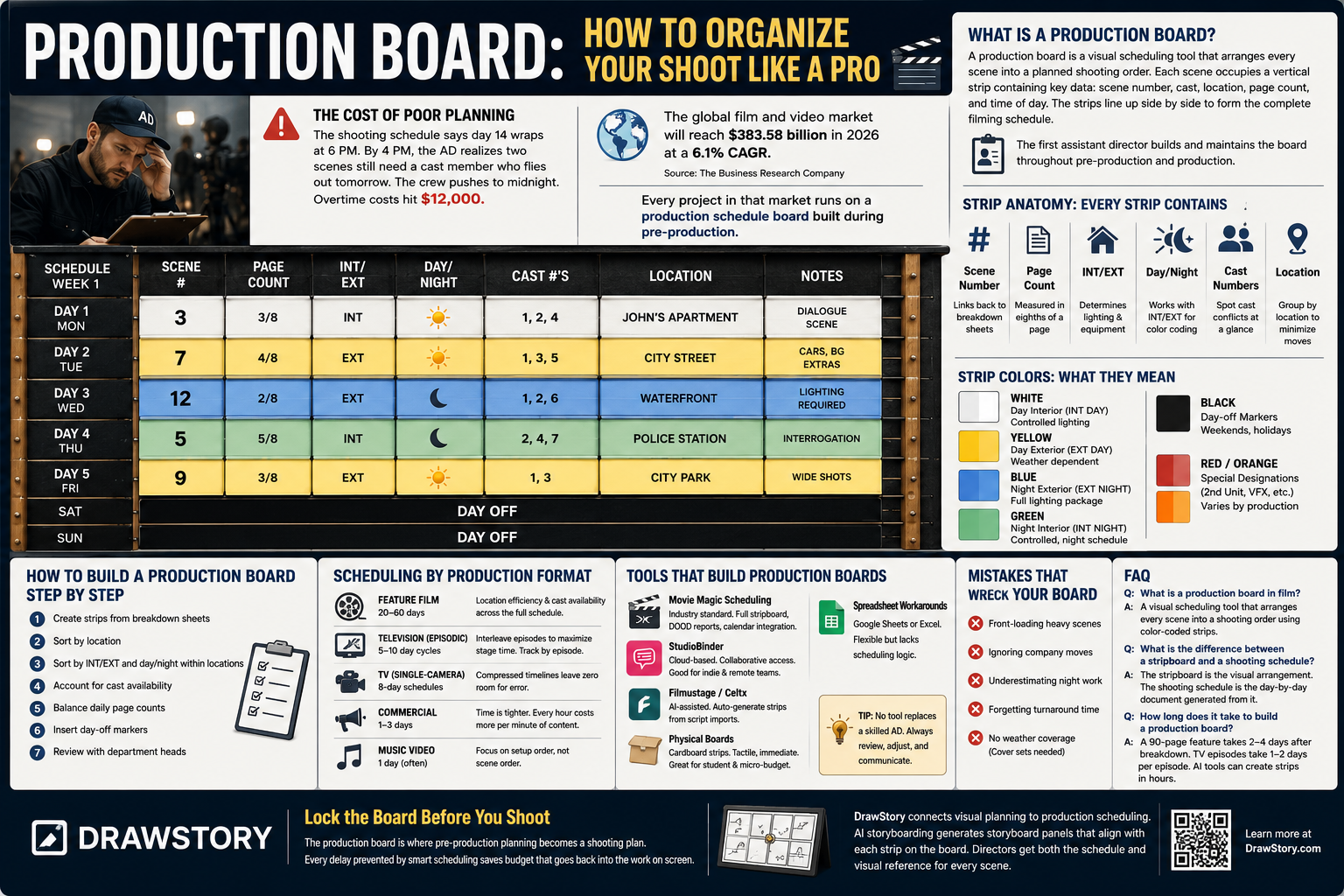
The shooting schedule says day 14 wraps at 6 PM. By 4 PM, the AD realizes two scenes still need a cast member who flies out tomorrow. The crew pushes to midnight. Overtime costs hit $12,000. One look at a properly built production board would have caught the conflict in pre-production, not on set.
The global film and video market will reach $383.58 billion in 2026 at a 6.1% CAGR (source: The Business Research Company). Every project in that market runs on a production schedule board built during pre-production. The board is where creative ambition meets logistical reality.
What Is a Production Board?
A production board is a visual scheduling tool that arranges every scene into a planned shooting order. Each scene occupies a vertical strip containing key data: scene number, cast, location, page count, and time of day. The strips line up side by side to form the complete filming schedule.
The traditional production board used physical cardboard strips inserted into a slotted frame. Modern productions use digital stripboards in scheduling software. The function remains identical. The first assistant director builds and maintains the board throughout pre-production and production.
How Does Strip Anatomy Work?
Every strip on the production board contains the same data fields. Understanding each field is essential before building the board.
- Scene number: Matches the numbered scene from the script breakdown. This links every strip back to its corresponding breakdown sheet.
- Page count: Measured in eighths of a page. A "3/8" strip means the scene covers three-eighths of a screenplay page. Page counts drive daily scheduling math. One page equals roughly one minute of screen time.
- Interior or exterior: Marked as INT or EXT. This determines lighting requirements, weather dependencies, and equipment packages.
- Day or night: Combined with INT/EXT to create four classifications that control strip color coding. These classifications drive the entire visual system of the board.
- Cast numbers: Each cast member gets a permanent number. The protagonist is typically number 1. Numbers appear on every strip where that cast member works. This allows the AD to spot cast availability conflicts at a glance. Storyboard examples show how cast blocking in storyboards aligns with production board planning.
- Location: The shooting location for the scene. Grouping strips by location minimizes company moves.
What Do Strip Colors Mean?
The production board uses a standard color-coding system. Every AD and production coordinator recognizes these colors instantly.
- White strips: Day interior scenes. These require controlled lighting setups on stage or inside practical locations.
- Yellow strips: Day exterior scenes. Weather-dependent. Schedules must account for cover sets when yellow strips dominate a shooting day.
- Blue strips: Night exterior scenes. These demand full lighting packages and often carry overtime costs for late-night crew calls.
- Green strips: Night interior scenes. Controlled environment but nighttime scheduling still affects crew turnaround requirements.
- Black strips (day-off markers): Inserted between shooting weeks to mark weekends and holidays. These do not represent scenes.
- Red or orange strips: Special designations that vary by production. Some ADs use red for second unit work. Others use orange for scenes requiring visual effects supervision. Best AI storyboard software helps visualize these complex scenes during pre-production planning.
How Do You Build a Production Board Step by Step?
The process starts after the script breakdown is complete. Every strip pulls data from the breakdown sheets.
- Step 1, Create strips from breakdown sheets: Generate one strip per scene. Transfer scene number, page count, INT/EXT, day/night, cast numbers, and location from each breakdown sheet to its strip.
- Step 2, Sort by location: Group all strips that share the same location. Shooting all scenes at one location before moving saves transportation time and setup costs.
- Step 3, Sort by INT/EXT and day/night within locations: Arrange day scenes together and night scenes together within each location group. This minimizes changeovers.
- Step 4, Account for cast availability: Check actor contracts and availability windows. Move strips to ensure no cast member is scheduled on unavailable dates. Script to storyboard AI tools help directors visualize scene sequences during this planning phase.
- Step 5, Balance daily page counts: Each shooting day should target a consistent page count. Overloading one day while underloading another creates overtime on heavy days and wasted crew time on light days.
- Step 6, Insert day-off markers: Place black strips between shooting weeks. Account for holidays, turnaround minimums, and any contractual rest days.
- Step 7, Review with department heads: Share the draft schedule with the production manager, cinematographer, and key departments. Each brings constraints the AD may not see. Film composition requirements from the DP may affect scene grouping.
How Does Scheduling Differ by Production Format?
A feature film production board looks different from a television or commercial board. Each format carries distinct scheduling pressures.
- Feature film: Shooting schedules run 20 to 60 days. The AD prioritizes location efficiency and cast availability across the full schedule. Scenes shoot out of story order based on logistics. The production planning board must track continuity across weeks of non-linear shooting.
- Television (episodic): Episodes shoot on 5 to 10 day cycles. Multiple episodes may share locations and cast. The board must interleave scenes from different episodes to maximize stage time. Cross-boarding requires tracking which episode each strip belongs to.
- Television (single-camera): Operates closer to feature scheduling but at compressed timelines. Eight-day schedules for one-hour episodes leave zero room for scheduling errors on the board.
- Commercial: Shoots run 1 to 3 days. The board is simpler but timing is tighter. Every hour costs more per minute of finished content. Setup time and talent holds dominate the filming schedule.
- Music video: Often single-day shoots with multiple setups. The board focuses on setup order rather than scene order. How filmmakers create storyboards with AI accelerates the visual planning that feeds into tight music video schedules.
What Tools Build Production Boards?
Tool selection depends on production scale and budget.
- Physical boards: Cardboard strips in slotted frames remain viable for student films and micro-budget projects. Tactile. Immediate. No software cost. Limited to one physical copy.
- Movie Magic Scheduling: The industry standard for decades. Used on major studio features and television series. Full stripboard, DOOD reports, and calendar integration.
- StudioBinder: Cloud-based scheduling with collaborative access. Good for independent productions and remote teams. Free tier available with limited features.
- Filmustage and Celtx: AI-assisted scheduling that auto-generates strips from script imports. Faster initial setup. Human review required for accuracy. Best AI storyboard generators extend this automation into visual shot planning.
- Spreadsheet workarounds: Google Sheets or Excel with colored rows simulating strips. Flexible but lacks built-in scheduling logic. Works for short films and proof-of-concept shoots. Video production with storyboarding workflows help fill the visual planning gap that spreadsheets miss.
What Mistakes Wreck a Production Board?
These errors compound through every shooting day.
- Front-loading heavy scenes: Placing the most complex scenes in week one before the crew finds its rhythm creates early overtime. Build difficulty gradually across the first week.
- Ignoring company moves: Moving the entire crew between locations mid-day wastes hours. Group location scenes together. A company move should happen overnight or over a meal break, not during shooting hours.
- Underestimating night work: Night exteriors take longer. Lighting setup time increases. Crew fatigue compounds across consecutive night shoots. Schedule no more than three consecutive night shoots without a turnaround day.
- Forgetting turnaround time: Union and guild rules require minimum rest periods between wrap and next call. A wrap at midnight means no call before 10 AM the next day. The board must reflect these requirements.
- No weather coverage: Day exterior scenes need interior backup scenes (cover sets) ready on the board. Previsualisation planning helps teams prepare visual alternatives for weather-dependent scenes.
Lock the Board Before You Shoot
The production board is where pre-production planning becomes a shooting plan. Every delay prevented by smart scheduling saves budget that goes back into the work on screen. Drawstory connects visual planning to production scheduling. AI storyboarding generates storyboard panels that align with each strip on the board. Directors get both the schedule and visual reference for every scene.
Frequently Asked Questions
Got Questions?
Find clear answers to common questions about Drawstory, our services, process, and how we bring your ideas to life.
What is a production board in film?


What is the difference between a stripboard and a shooting schedule?
How long does it take to build a production board?



