Sign Up
Cinematic Storyboard for Animation: Plan Scenes with AI [2026]
Author:
Narek Ghazaryan
Date:
July 7, 2026
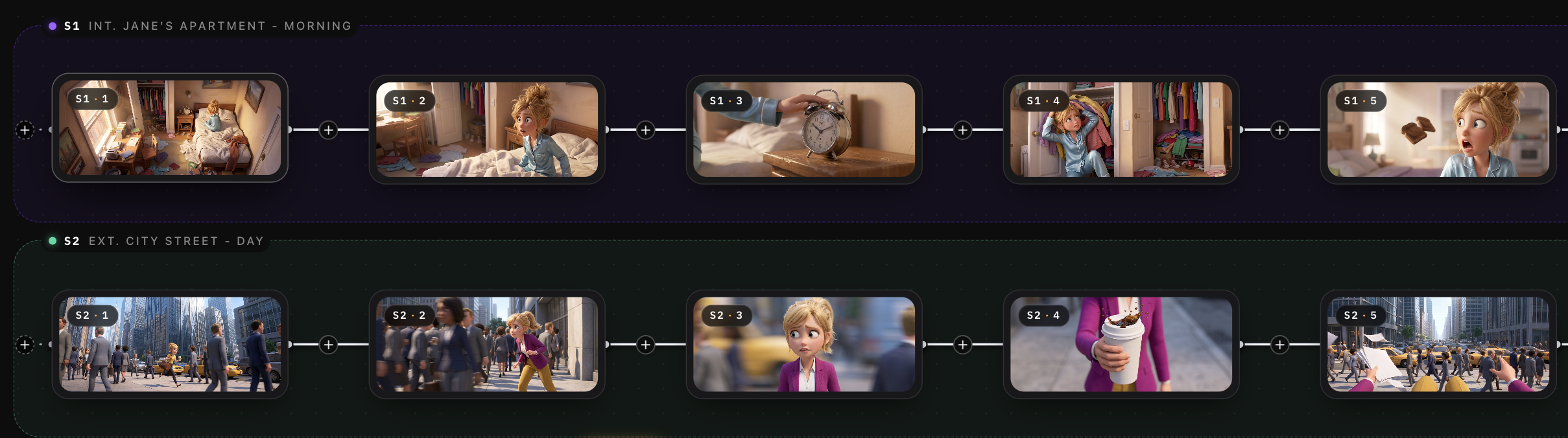
Cinematic Storyboard for Animation: How to Plan Animated Scenes Like a Film
The difference between an animated sequence that feels flat and one that feels like cinema comes down to how the board was planned. A cinematic storyboard for animation does not just map out what happens. It maps out how the camera sees what happens.
The global 3D animation market was valued at USD 25.26 billion in 2024 and is projected to reach USD 51.03 billion by 2030 at a CAGR of 12.3% (Grand View Research). As studios scale production across feature films, series, and branded content, the boards that drive those productions need to carry the same cinematic weight as a live-action shoot.
This guide covers how to apply film techniques to your animation storyboard, what separates a cinematic board from a standard one, and how to plan animated scenes the way a director plans a shoot.
What Makes an Animation Storyboard Cinematic
A standard animation storyboard shows the key poses and actions in a sequence. A cinematic animation storyboard goes further. It communicates shot type, camera angle, depth, lens feel, lighting direction, and emotional tone in every panel. The board reads less like a comic strip and more like a cinematic storyboard for a live-action production.
In live action, the camera creates emotion. A low angle makes a character feel powerful. A slow dolly-in builds tension. A rack focus shifts attention from foreground to background. Animation has every one of these tools available, but they only work if the storyboard artist plans for them. The board is where the "camera" is built.
Why Animation Storyboards Need Film Language
In live action, the director can improvise on set. Adjust blocking during rehearsal. Discover a better angle through the viewfinder. In animation, none of that exists. What you board is what gets animated. What you skip in the board does not appear in the final frame.
This is why cinematic storyboard animation matters more than most teams realize. The board is not a planning document. It is the film in its earliest form. Every camera choice, every transition, every spatial relationship between characters needs to be solved on paper before a single frame is rendered.
Teams that skip cinematic planning in their storyboard creation process end up with sequences that look technically polished but feel visually flat. The animation is clean. The lighting is rendered. But the shots do not build. The cuts do not carry weight. The audience watches without feeling pulled into the scene.
Film Techniques That Work in Animation Storyboards
Shot Types and Framing
Every panel needs a defined shot type. Wide, medium, close-up, extreme close-up, over-the-shoulder. The shot type tells the animator what matters in the frame. A wide shot establishes the space. A close-up isolates emotion. An over-the-shoulder shot places the viewer inside a conversation. Build your shot list before you draw a single panel so every frame has a clear purpose.
Camera Movement
Pans, tilts, dollies, tracking shots, crane moves. Animation storyboards should indicate planned camera motion with arrows, path lines, and notes. A slow push-in on a character's face during a revelation. A lateral tracking shot following a chase. A crane pull-back revealing the scale of a landscape. These movements are planned on the board, not in post. Mark them clearly so the cinematic composition carries through to the final render.
Depth and Layering
Flat boards produce flat animation. Cinematic boards use foreground, midground, and background layers to create depth. Place objects or characters at different distances from the camera. Overlap elements. Use scale differences to show spatial relationships. When the board has depth, the final frame feels three-dimensional even in 2D animation.
Lighting and Mood
Shade your panels. A fully lit board tells the animator nothing about mood. A board with strong shadows, rim lighting, or silhouettes tells them everything. Use darkness to create tension. Use high-key lighting for open, positive scenes. Indicate light source direction with simple arrows. The lighting plan starts on the storyboard, not in the render queue.
What Every Cinematic Animation Panel Should Include
A cinematic storyboard animation panel carries more information than a standard one. Each frame should communicate the following:
- Shot type and size: Label every panel (WS, MS, CU, ECU, OTS). This prevents ambiguity during layout and animation.
- Camera angle: Eye level, low angle, high angle, Dutch tilt. The angle shapes how the viewer reads power, vulnerability, and tension in the frame.
- Camera movement notes: Arrows showing pan direction, dolly path, or zoom range. Include speed notes where pacing matters.
- Character staging: Where each character stands relative to the camera and to each other. Character consistency across panels is critical. The same face and proportions must carry from one shot to the next.
- Lighting direction: A simple arrow or shading pass that shows where the key light falls. This feeds the lighting department directly.
- Action and dialogue cues: Short notes below the panel describing what happens and what is said. Keep these brief. Two sentences maximum.
- Transition markers: Cut, dissolve, fade, match cut. Mark how each panel connects to the next so the editor and animator plan their timing accordingly.
Live-Action vs Animation Storyboards
The two formats share visual language but serve different production realities.
The takeaway: animation boards carry more responsibility. Every creative decision that a live-action set resolves through rehearsal and improvisation must be solved on the board instead.
How to Plan Animated Scenes Like a Director
1. Break the Script Into Beats
Read the script and identify every story beat, emotional shift, and location change. Each beat becomes a potential shot or sequence of shots. Do not start drawing until you have a written beat map that covers the entire scene. This beat map is your shooting script for animation.
2. Thumbnail the Sequence
Draw small, rough thumbnails for every beat. Stick figures are fine. The goal is composition and flow, not polish. Fit 12 to 20 thumbnails on a single page so you can see the full sequence at a glance. This is where you experiment with alternatives to traditional storyboarding layouts and find the rhythm of the scene.
3. Apply Cinematic Shot Language
Go back through each thumbnail and assign a shot type, camera angle, and movement note. Ask yourself: what does the camera need to do here to create the right emotion? A wide establishing shot to orient the audience. A tight close-up when the character realizes the truth. A tracking shot to follow the chase. Label everything. If a thumbnail does not have a shot type, it is not ready for the next step.
4. Lock Characters and Build Full Panels
Expand each thumbnail into a detailed panel with character staging, background elements, and lighting cues. Character identity must stay locked across every panel. Same face, same proportions, same wardrobe unless the story calls for a change. Script to storyboard AI tools can automate this step by reading your screenplay and generating panels with consistent characters placed in the correct shots.
5. Test With an Animatic
Import your finished panels into a timeline and set shot durations. Add scratch voiceover and temp music. Play the sequence. This animatic reveals timing problems that static boards never will. If a shot feels too long, trim it. If a transition feels abrupt, add a beat. The animatic is your last chance to fix pacing before animation begins.
Mistakes That Make Animation Boards Look Flat
Using the Same Shot Type for Every Panel
- A board full of medium shots at eye level has no visual energy. The sequence feels like a security camera recording a conversation.
- Vary shot types deliberately. Follow a wide shot with a close-up. Use a low angle for a moment of power and a high angle for vulnerability. Contrast creates rhythm.
Skipping Camera Movement Notes
- Panels without movement notes produce static animation. The animator does not know whether the camera should push in, pull back, or hold steady.
- Mark every planned camera move with arrows and speed notes. Even a slow, subtle drift adds life to a shot that a locked-off frame does not have.
Ignoring Lighting in the Board
- Flat, evenly-lit panels strip the emotional layer from the scene. The animator receives no lighting direction and defaults to neutral fill light.
- Shade your boards. Use a mood board to define the lighting palette for each sequence before boarding. Even rough shading with two values (light and shadow) gives the lighting team a foundation to build from.
From Script to Cinematic Storyboard in Minutes
Planning animated scenes like a filmmaker starts with the board. Drawstory reads your screenplay and generates cinematic storyboard animation panels with locked character identities, defined shot types, and sequenced scenes. Every panel maintains the same face, outfit, and proportions from the first frame to the last. No drawing. No drift. Start free and go from script to finished cinematic storyboard in minutes.
Frequently Asked Questions
Got Questions?
Find clear answers to common questions about Drawstory, our services, process, and how we bring your ideas to life.
What is a cinematic storyboard for animation?


How is an animation storyboard different from a live-action one?
Can AI help create cinematic animation storyboards?
How many panels should a cinematic animation storyboard have?
Do animation storyboards need camera movement?



