Sign Up
Best 10 Manga AI Tools for 2026: Features, Pricing, Pros and Cons
Author:
Zoha Shahzad Butt
Date:
August 20, 2026
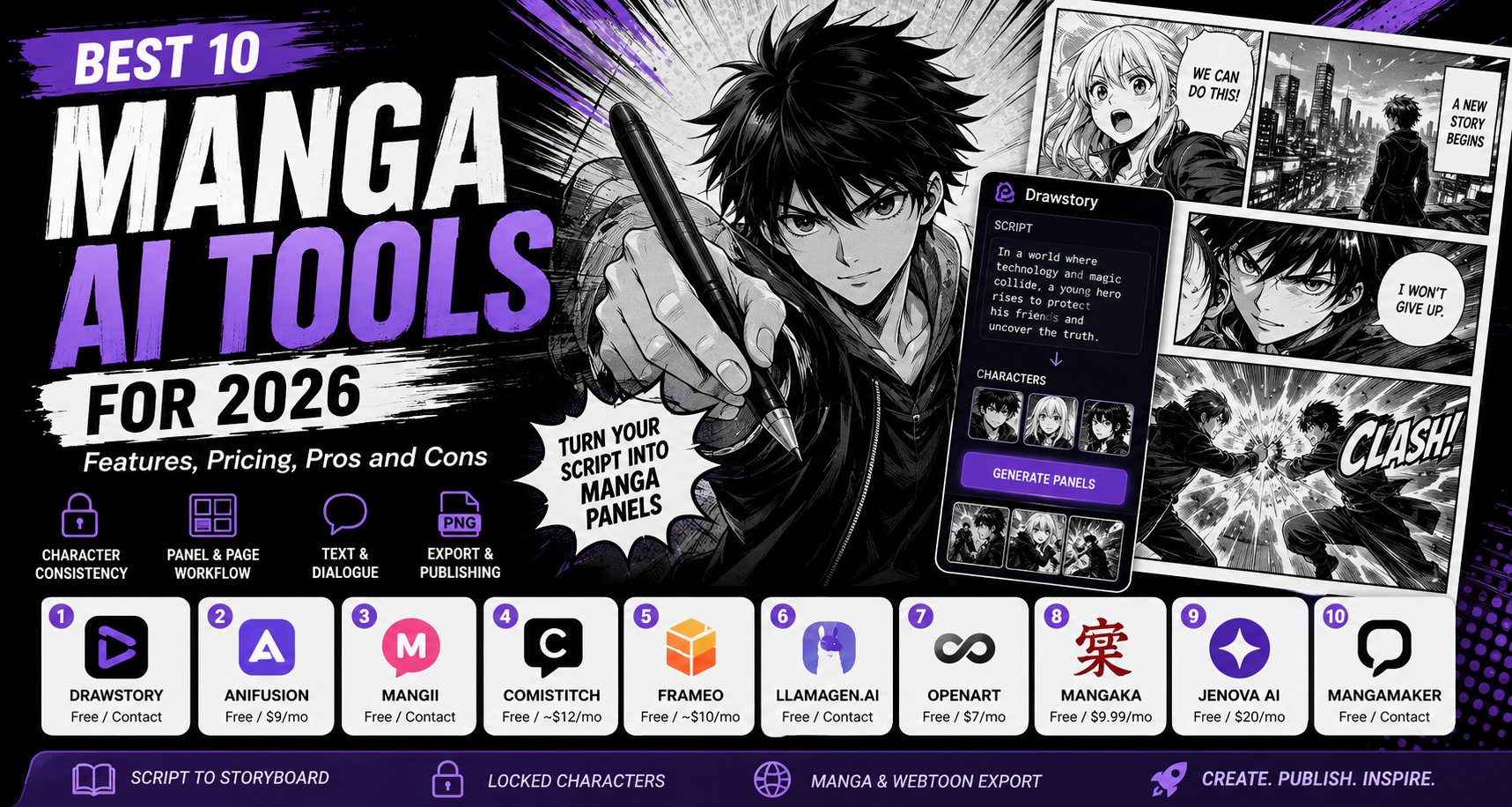
The global manga market hit USD 23.12 billion in 2026. With demand at record levels, manga AI tools are making it possible for writers, indie creators, and studios to produce manga without years of illustration training.
But the market is crowded. Some tools generate single images. Others build full chapters from a script. A few handle character consistency well. Most do not. This guide breaks down the 10 best manga AI tools available right now. Each entry covers what the tool does, what it costs, and where it falls short.
How We Evaluated These Manga AI Tools
Not every AI image generator qualifies as a manga AI tool. We filtered for platforms that go beyond standalone anime-style images. Here is what mattered:
• Character consistency: Can the tool keep the same character identical across multiple panels? This is the biggest differentiator between manga AI tools and generic image generators.
• Panel and page workflow: Does it generate panels, pages, or chapters? Tools that only produce individual images leave you to assemble everything yourself.
• Manga-specific styles: Shonen, shojo, seinen, chibi, webtoon. A dedicated tool offers style control beyond a generic anime filter.
• Text and dialogue: Speech bubbles, dialogue placement, and vertical text. The best tools handle them automatically.
• Export and publishing: Manga/webtoon format export, resolution options, and commercial use rights.
Side-by-Side Feature Comparison
This table summarizes how each manga AI tool handles the five criteria that matter most. For a broader look at AI comic tools, see this best AI comic maker tools comparison.
The 10 Best Manga AI Tools for 2026
1. Drawstory
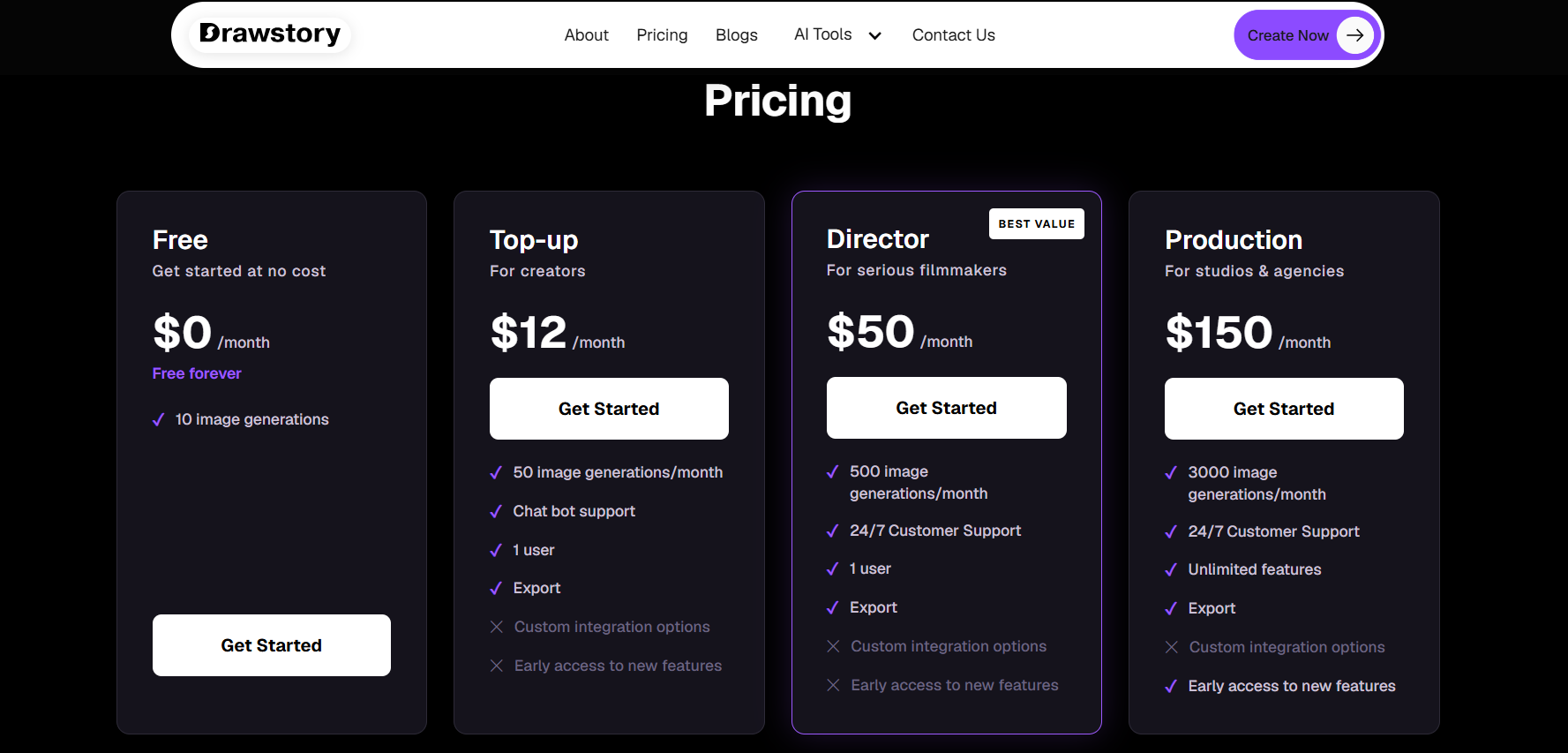
Drawstory is an AI manga creation platform built for script-to-storyboard workflows. Upload your plot, define your characters, and get fully illustrated panels with cinematic composition, dialogue placement, and consistent characters. The AI character design system locks each character's face, hair, and clothing across every panel in the chapter.
• Key features: Script-to-panel generation, locked character identity, cinematic storyboard output, manga and webtoon export, storyboard templates
• Pricing: Free tier available. Paid plans for higher volumes and commercial rights.
• Pros: Full script-to-panel pipeline. Strongest character consistency. Manga and webtoon export. Production-ready panel data.
• Cons: Focused on storyboard workflow rather than freeform image generation.
• Best for: Writers and mangaka who want illustrated panels from a script without drawing.
2. Anifusion
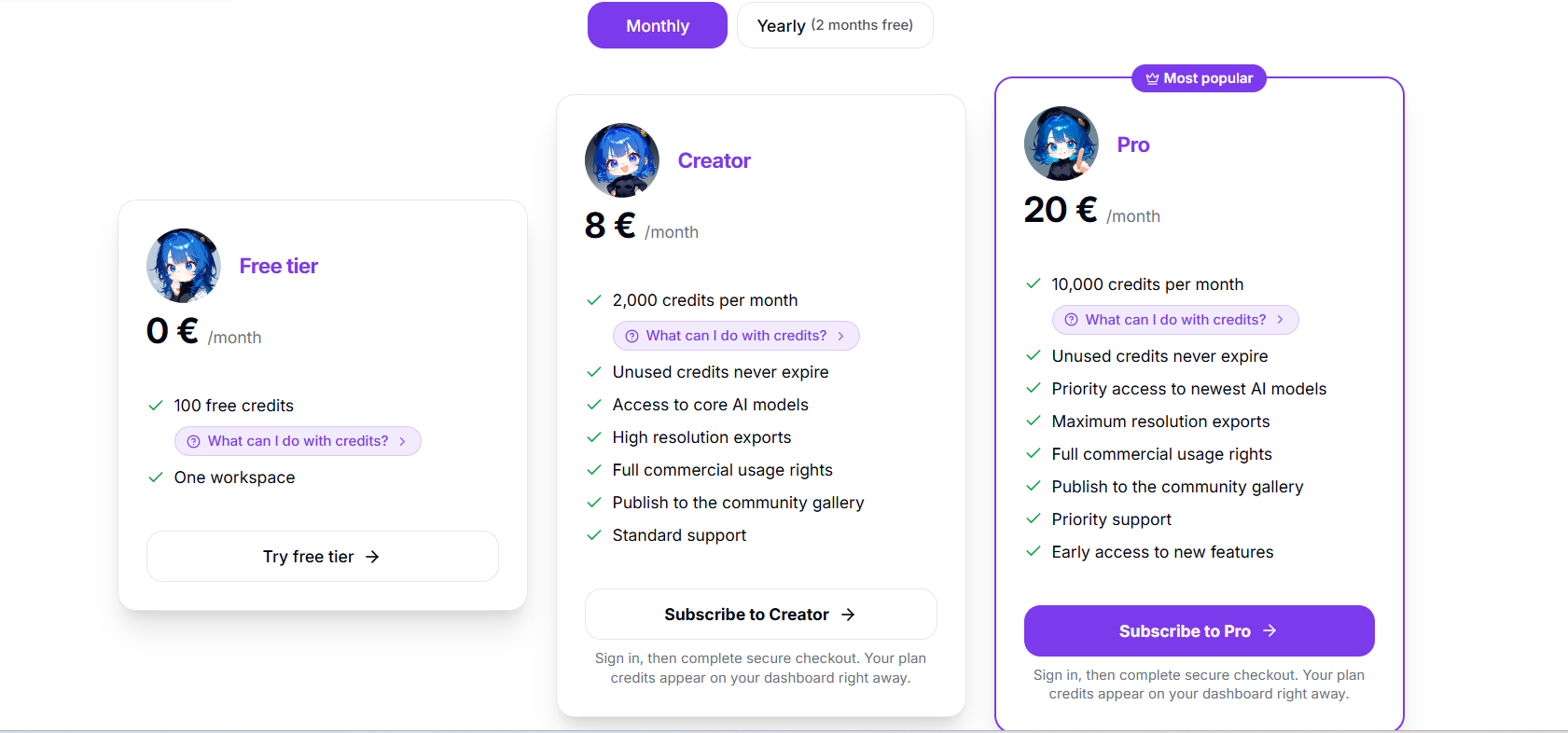
Anifusion is an AI manga studio with built-in panel layouts, character sheets, speech bubbles, and editing tools. It supports 30+ AI models including AnimagineXL 4.0 and FLUX.
• Key features: Text-to-manga generation, custom panel layouts, character sheets, video animation, LoRA model training
• Pricing: Free (100 credits). Creator $9/month. Pro $24/month.
• Pros: Wide model selection. Built-in canvas editor. Vertical text and manga lettering. Active community.
• Cons: No script-to-chapter pipeline. Panel-by-panel workflow. Desktop only.
• Best for: Creators who want per-panel control with multiple AI model options.
3. Mangii
Mangii is a prompt-to-panel ai manga generator that turns scene descriptions into manga chapters. Choose from 9+ style directions (shonen, shojo, dark fantasy, manhwa) and publish chapters directly.
• Key features: Prompt-to-panel generation, 9+ manga styles, chapter-based story building, mobile apps
• Pricing: Free tier available. Paid plans for higher limits.
• Pros: Fast output. Strong style variety. Mobile app. Built-in chapter publishing.
• Cons: Less panel composition control. Character drift in longer chapters. Limited editing.
• Best for: Casual creators who want to create and share ai manga stories quickly.
4. Comistitch
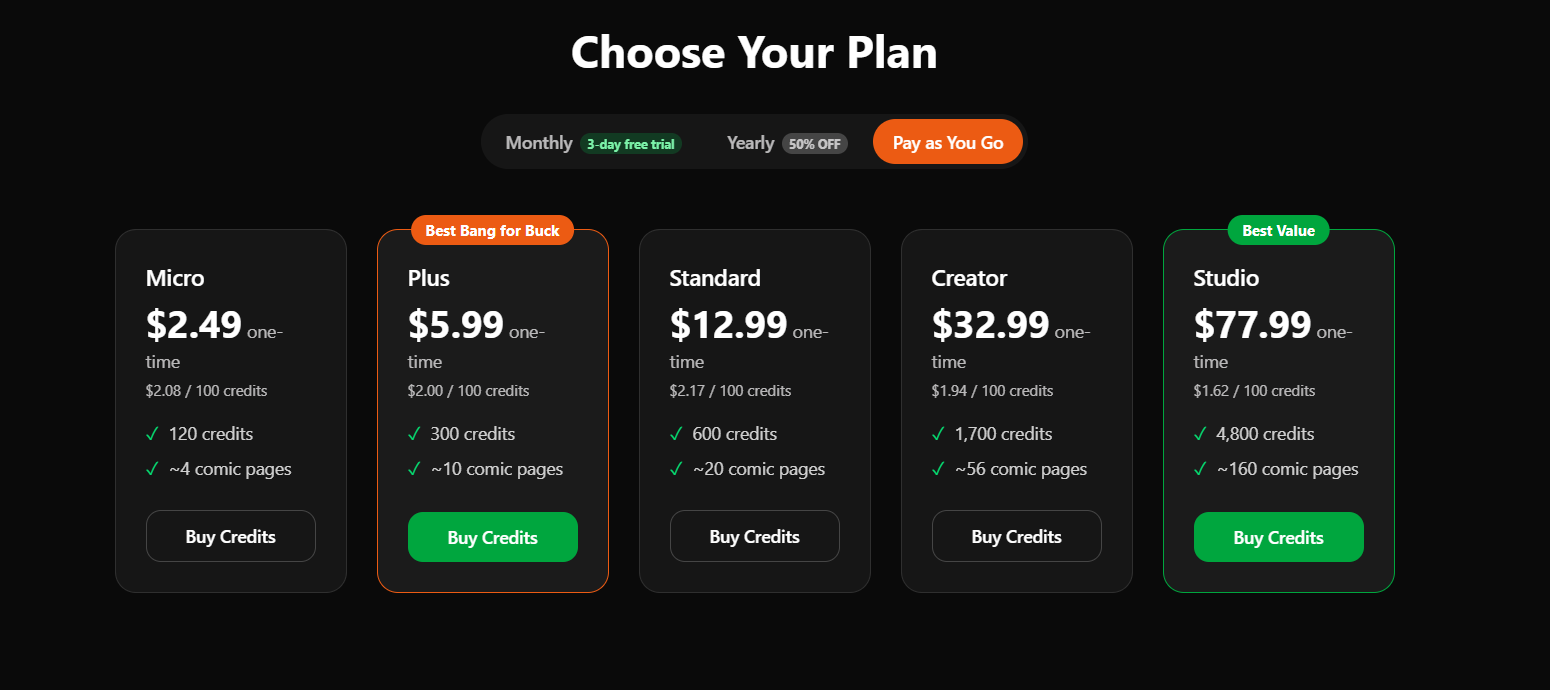
Comistitch offers a story-to-comic pipeline with face-lock technology for character consistency. Write a premise, and the AI breaks it into panels and generates art.
• Key features: Story-to-comic pipeline, face-lock consistency, manga/webtoon/comic styles, character creator
• Pricing: Free tier (3-5 pages). Paid from $12-20/month.
• Pros: Automated script-to-panel. Good character consistency. Multiple styles.
• Cons: Newer platform, smaller community. Fewer style variations than Anifusion.
• Best for: Writers who want a story-in, manga-out workflow.
5. Frameo
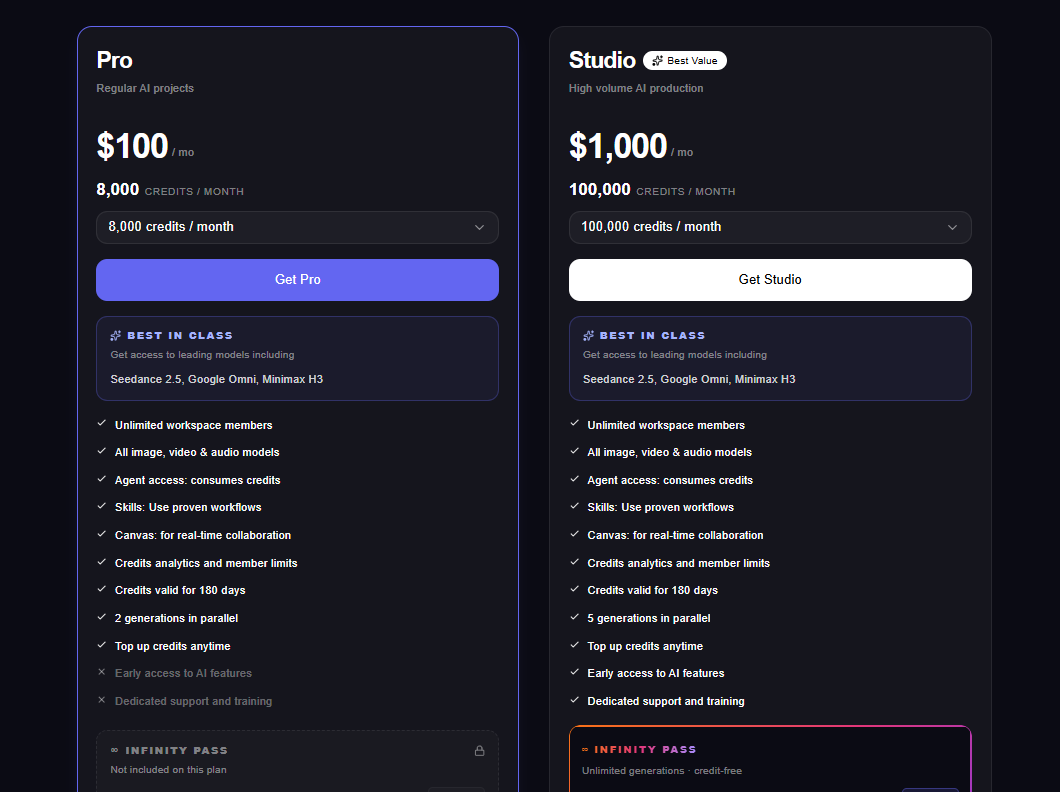
Frameo.ai is a panel-by-panel editor with AI generation and a built-in distribution platform. It gives more manual control over each scene than pipeline tools.
• Key features: Panel-by-panel AI generation, character model saving, Dashtoon Reader distribution, Creator's Program
• Pricing: Free (100 images/day). Pro from ~$10/month.
• Pros: Generous free tier. Built-in distribution. Good per-panel control.
• Cons: Slow for long chapters. No script pipeline. Free creators publish on Dashtoon Reader only.
• Best for: Webcomic creators who want to build and distribute on one platform.
6. LlamaGen.AI
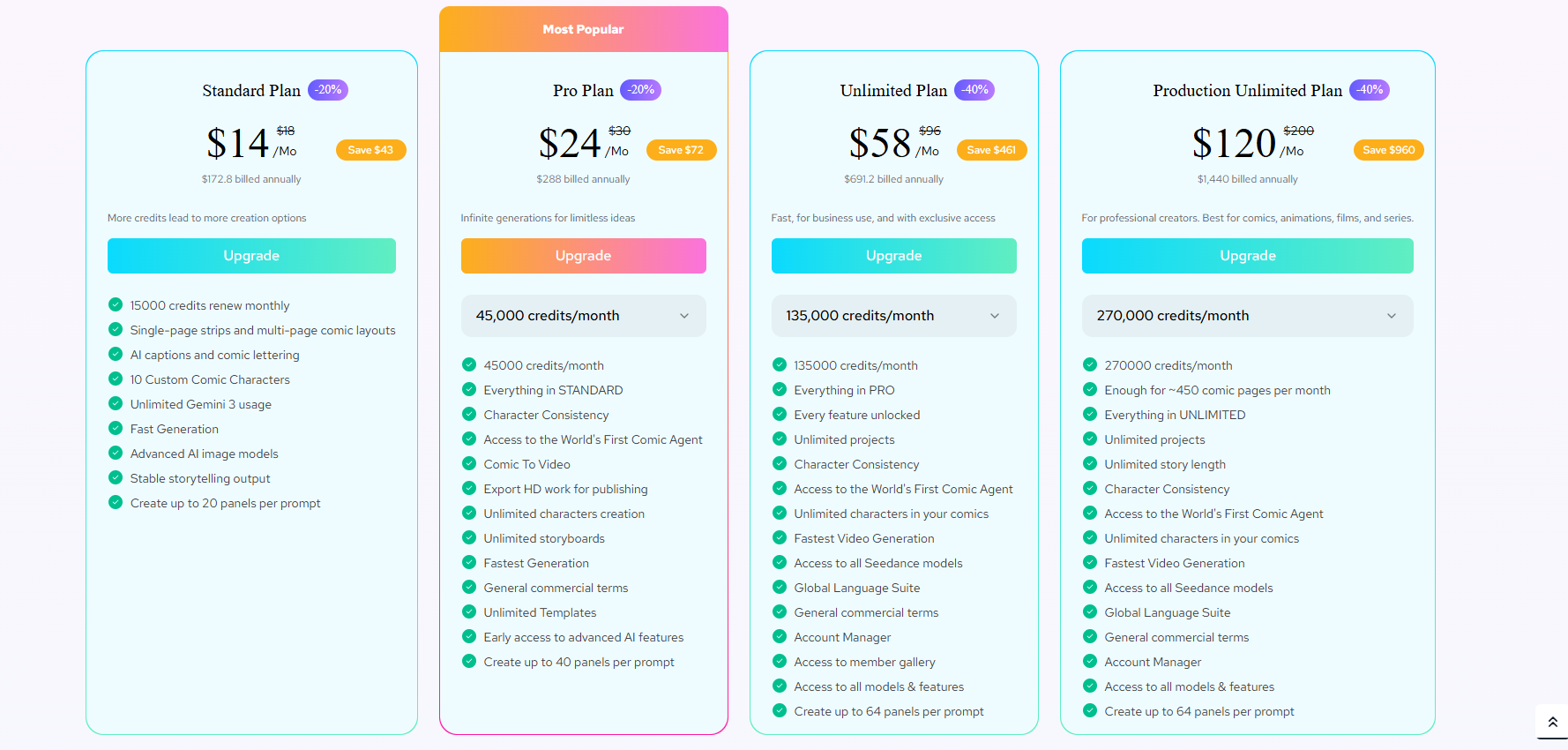
LlamaGen.AI is an ai manga maker and comic workspace focused on self-publishing, with a Comic Copilot agent and KDP-ready export.
• Key features: Comic Copilot AI agent, consistent characters, comic-to-video, KDP export, API access
• Pricing: Free tier available. Paid plans for higher limits.
• Pros: Built for self-publishing. Comic-to-video. API access. Desktop and mobile apps.
• Cons: Interface can overwhelm beginners. Art quality varies by model.
• Best for: Self-publishers targeting Amazon KDP.
7. OpenArt
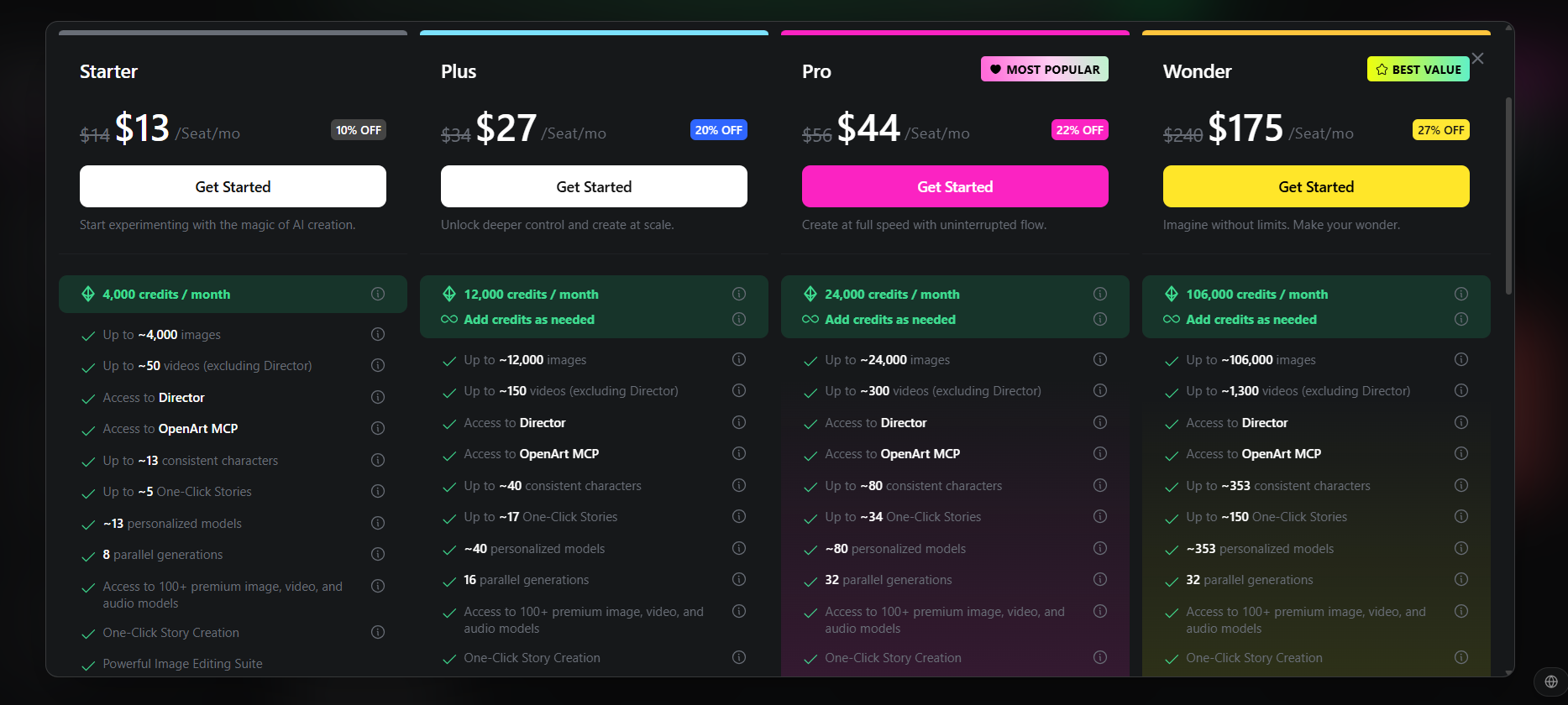
OpenArt is a general AI art platform with 100+ models (GPT Image, Nano Banana Pro) and character consistency training for manga-style generation.
• Key features: 100+ AI models, character training, inpainting, anime/manga filters, API
• Pricing: Free (40 credits). Essential $7/month. Wonder $120/month.
• Pros: Massive model library. Affordable. Character consistency training.
• Cons: No built-in panel layout or speech bubbles. Manual assembly required.
• Best for: Artists who want manga-style images and will assemble panels manually.
8. Mangaka
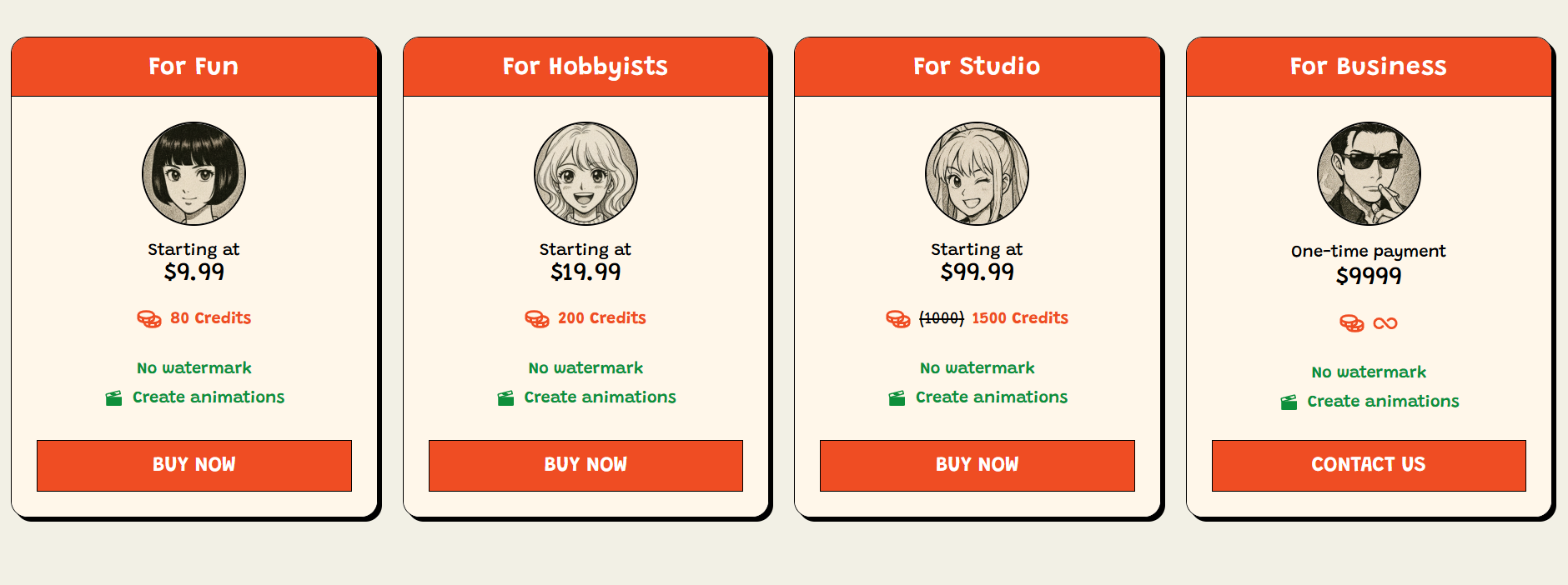
Mangaka (mangaka.app) turns dialogue or story scripts into manga-style art using AI models tuned for Japanese comic styles.
• Key features: Script-to-manga generation, Japanese comic models, character design
• Pricing: Free plan. Paid from $9.99 to $99.99/month.
• Pros: Manga-specific models. Script-based input. Affordable entry.
• Cons: Smaller user base. Fewer styles. Limited documentation.
• Best for: Creators who want manga-specific output at a low price.
9. Jenova AI
Jenova AI offers a manga creator with character reference sheets, five art style templates, and a plot memory engine that tracks story context across sessions.
• Key features: Character reference sheets, 5 art styles, plot memory engine, persistent project tracking
• Pricing: Free tier. Paid from $20/month.
• Pros: Plot memory for story continuity. Character reference sheets.
• Cons: Higher price point. Fewer style templates. Smaller community.
• Best for: Serial manga creators who need story context tracked across projects.
10. MangaMaker
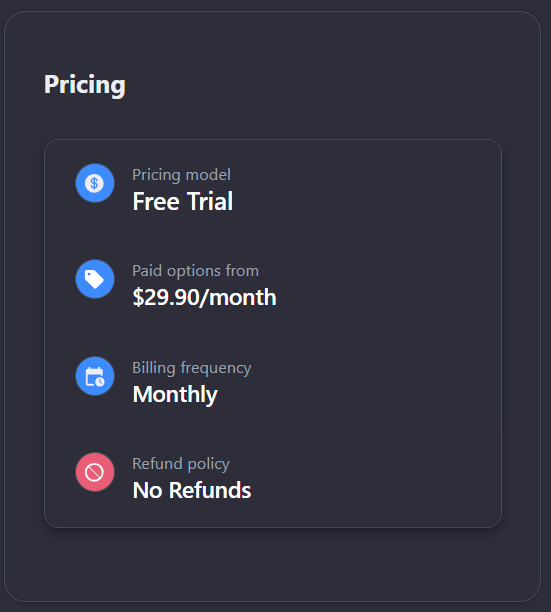
MangaMaker (mangamaker.app) is a free ai manga generator and comic maker with a simple prompt-to-page interface for quick manga creation.
• Key features: Prompt-to-manga-page generation, comic panel layouts, free tier
• Pricing: Free tier available. Paid for higher quality.
• Pros: Low barrier to entry. Simple interface. Free experimentation.
• Cons: Limited character consistency. Fewer advanced features. Basic editing.
• Best for: Beginners experimenting with ai manga creation for the first time.
Which Manga AI Tool Fits Your Workflow?
The right manga AI tool depends on how you create it.
If you are a writer who wants to paste a script and get illustrated manga panels back, Drawstory and Comistitch offer the strongest script-to-storyboard pipelines. Both handle character locking and panel flow automatically.
If you want per-panel control and are comfortable directing each scene, Anifusion and Dashtoon give more manual influence over composition. Anifusion's model library is the deepest in the market.
If you are publishing on Amazon KDP or building a self-publishing business, LlamaGen.AI is tailored for that workflow with KDP-ready export.
If you are new to manga AI and want to experiment before committing, MangaMaker and Dashtoon's free tier offer the lowest barriers. For a broader look at how AI is reshaping visual storytelling, see this guide to alternatives to traditional storyboarding.
Turn Your Script into Manga Panels Today
Ready to go from story to illustrated manga? Drawstory generates storyboard panels from your plot with locked characters, manga-quality composition, and production-ready output. Upload your script and start free.
Frequently Asked Questions
Got Questions?
Find clear answers to common questions about Drawstory, our services, process, and how we bring your ideas to life.
Can AI create manga?


Which AI is best for manga?
How do you make manga with AI?
Is AI-generated manga legal to publish?
Can AI manga generators create a complete manga from a script?



