Sign Up
Video Production Workflow Guide: Managing Projects with AI
Author:
Narek Ghazaryan
Date:
May 20, 2026
A solid video production workflow is no longer a nice-to-have. It is the difference between hitting deadlines and watching them slip. In 2026, AI sits inside every stage of the video creation process, from the first brief to final delivery. Teams that use it well are shipping faster, spending less, and producing more.
This guide walks you through every phase of the video production workflow. You will see where AI fits, which tools matter, and how to keep quality high.
What Is a Video Production Workflow?
A video production workflow is the structured process a project moves through from concept to final delivery. It defines who does what, when handoffs happen, and how feedback flows. Without one, projects stall in revisions or get buried in version-control chaos.
A clear production pipeline brings three things to a team:
- Visibility into project status at any point
- Accountability for each task and stakeholder
- Predictable timelines, even when scope shifts
According to Wyzowl's 2026 report, 91% of businesses now use video as a marketing tool. That means more projects, more revisions, and more pressure on the workflow itself.
What Are the Five Stages of a Modern Video Production Workflow?
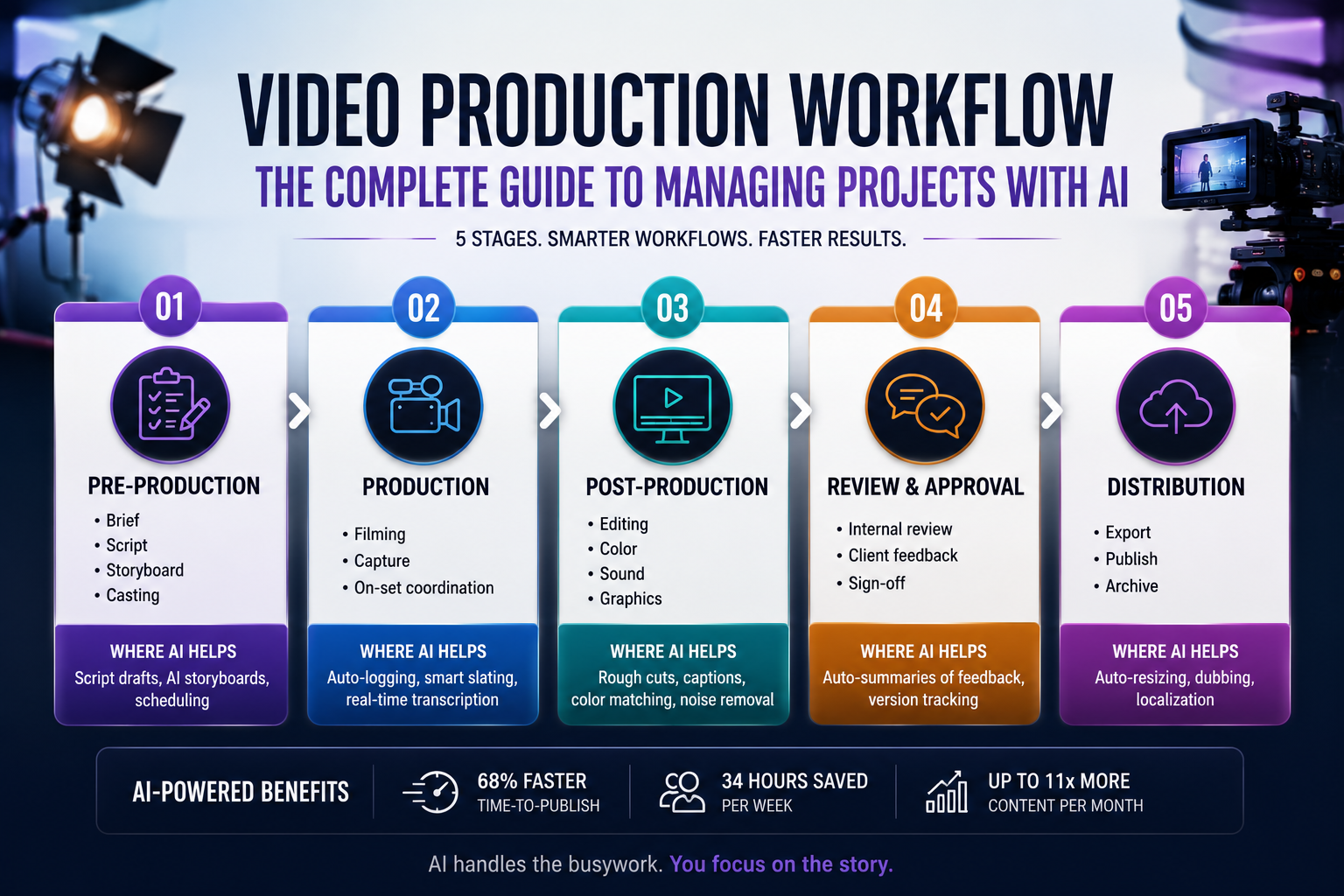
Most teams break the workflow into five stages. AI now plays a role in each one.
Stage 1: Pre-Production Workflow
Pre-production is where most projects are won or lost. Skip it, and you pay for the gaps later in reshoots and rework.
A strong pre-production workflow covers the brief, script, storyboard, shot list, schedule, and budget. It also locks down approvals before anyone touches a camera. Pre-production sign-off is a non-negotiable checkpoint. Catching a story problem at storyboard takes minutes. Catching it in post takes days.
AI now speeds up this stage without replacing the thinking behind it. Tools like ChatGPT and Claude help draft scripts and refine briefs. AI storyboarding generators turn written scenes into visual frames. AI agents can build first-draft schedules from your script and team availability.
A practical pre-production checklist looks like this:
● Define goals, audience, and key message
● Approve the script and storyboard
● Lock the shot list and schedule
● Confirm budget, crew, and locations
● Centralize all assets in one shared space
Stage 2: Production
Production is where raw material gets created. The goal here is clean, organized footage that hands off cleanly to post.
Coordination is everything on set. Call sheets, shot lists, and a tight schedule keep the day on track. Script to storyboard AI tools help directors reference visual plans on set during shooting. File management starts here too. Use a consistent folder structure from day one with raw footage, audio, graphics, and reference files in clearly labeled folders.
AI is changing the on-set experience in subtle ways. Real-time transcription tools log dialogue as it happens. Smart cameras tag shots automatically. Cloud-based asset management uploads footage straight from the camera, so editors can start cutting before the shoot wraps.
Stage 3: Post-Production
Post-production used to swallow most of the timeline. AI has cut that dramatically. The average 60-second marketing video now takes 27 minutes to produce with AI, down from 13 days with traditional methods.
The core post-production tasks remain:
● Logging and selecting footage
● Editing the rough cut
● Color correction and grading
● Sound design and audio mixing
● Motion graphics and visual effects
● Captions and subtitles
Editing software like Adobe Premiere Pro, Final Cut Pro, and DaVinci Resolve now ship with native AI features. Descript edits video by editing the transcript. Runway and Veo generate B-roll on demand. Film composition principles still guide every editorial decision, regardless of the tool. AI tools handle auto-captions, color matching, and noise removal in seconds.
Use AI selectively. Let it handle repetitive work like transcription, rough assembly, and exports. Keep creative judgment in human hands.
Stage 4: Review and Approval
This is where most workflows quietly break down. A messy review stage costs more than any other phase, in time, client trust, and unbilled revision rounds.
Build review as its own structured process:
1. Internal review first, before anything goes to the client
2. Consolidate notes into one document, not scattered emails
3. Send the client a single link with clear feedback prompts
4. Set a revision-round limit in writing
5. Lock the final version before export
AI helps here too. Tools like Frame.io and Krock.io centralize comments on the timeline. AI summarizers turn long client emails into action items. Video production with storyboarding workflows help teams trace review notes back to original visual plans.
Stage 5: Distribution
Distribution is where the video actually earns its budget. Each platform has its own format, length, and aspect ratio requirements.
AI now handles most of this work. Smart-cropping tools auto-reframe horizontal video for vertical platforms. Dubbing tools translate and lip-sync videos into multiple languages at a fraction of past cost. Localization that once cost $8 to $15 per second now runs around $0.12 per second with AI.
Archive every project asset in a searchable library. Storyboard to video pipeline tools connect archived pre-production assets to future projects. You will reuse footage, graphics, and music more often than you expect.
How Is AI Reshaping Video Project Management?
AI is not just a creative tool. It is also a project management layer. AI agents now sit on top of platforms like Monday.com, Asana, and Notion. They track deadlines, flag risks, and route content for review automatically.
The numbers back this up. AI video tools save teams 34 hours per week on production tasks. Teams report 68% faster time-to-publish. Agencies produce up to 11 times more content per month with the same headcount.
But AI does not remove the need for producers, editors, or directors. It raises the premium on judgment. Ideas, taste, and pacing remain human work. The teams that win in 2026 treat AI as workflow infrastructure, not a creative shortcut. Best AI storyboard software shows how AI handles visual planning so teams can focus on creative direction.
What Bottlenecks Stall a Video Production Workflow?
Even with AI, certain problems stall a video production workflow. Vague briefs force rework downstream. Scattered feedback across email, Slack, and comments creates confusion. Inconsistent file naming slows every handoff. Endless revision rounds drain budgets. Missing pre-production sign-off leads to costly corrections.
Fix the brief first. Build a template that every project starts with. Lock version control on day one. Set revision limits in the contract. These small structural fixes save more time than any new tool. How to turn a creative brief into storyboard workflows show how a tight brief connects directly to visual planning.
How Do You Choose the Right Tools for Your Production Pipeline?
The right video production workflow stack depends on team size and project type.
Project management: Monday.com, Asana, Notion, and Trello handle task tracking and team coordination.
Scriptwriting: Google Docs, ChatGPT, and Claude generate and refine scripts collaboratively.
Storyboarding: Storyboard examples from tools like Boords and Krock.io show how visual planning integrates with production workflows.
Editing: Premiere Pro, Final Cut Pro, DaVinci Resolve, and Descript cover every editing need from rough cut to final grade.
AI generation: Runway, Veo, Sora, and Synthesia produce AI-generated video and synthetic presenters.
Review and approval: Frame.io, Krock.io, and Vimeo Review centralize feedback on the timeline.
Asset management: Iconik, Frame.io, and ImageKit organize and distribute final deliverables.
Pick tools that connect. The biggest gains come from integrations that move content between stages without manual handoffs.
Build the Workflow Before You Hit Record
A strong video production workflow is built on clarity, not complexity. Define each stage. Lock approvals at the right checkpoints. Use AI for repetitive work and keep human judgment on creative decisions.
DrawStory fits into the pre-production stage of this pipeline. Best AI storyboard generators turn scripts into storyboard panels that feed directly into shot lists, schedules, and editorial plans. The visual planning starts before the camera rolls.
Frequently Asked Questions
Got Questions?
Find clear answers to common questions about Drawstory, our services, process, and how we bring your ideas to life.
What is a video production workflow?


Why is video production workflow important?
How is AI used in video production workflows?
Which stage benefits the most from AI?
Can small teams build a professional video production pipeline?



