Sign Up
AI Filmmaking Tools and Workflows
Author:
Narek Ghazaryan
Date:
May 15, 2026
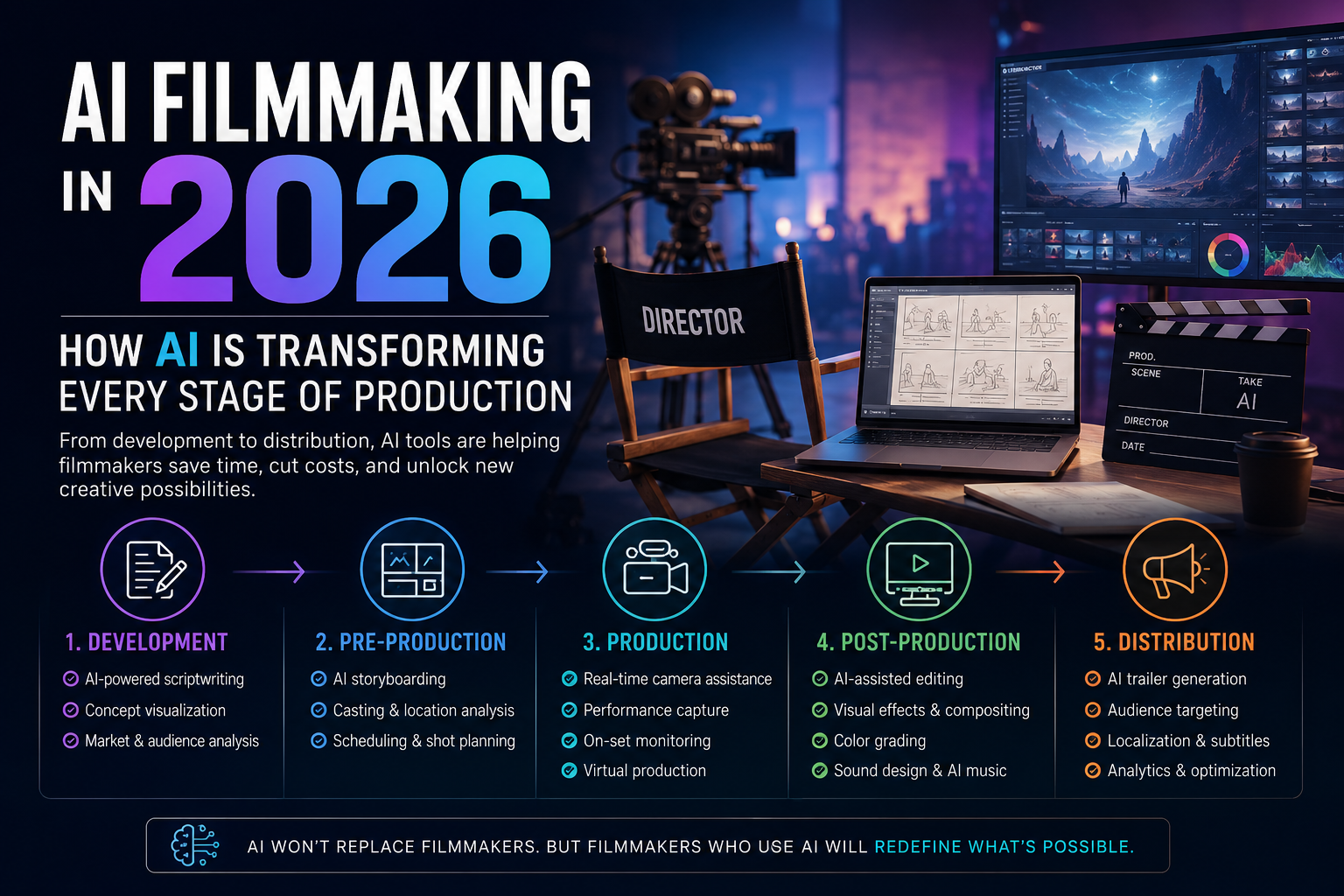
Filmmaking has five stages. Development, pre-production, production, post-production, and distribution. AI now touches every single one. AI filmmaking is not a gimmick or shortcut. It is infrastructure that reshapes what each stage costs and how many people it requires.
The global AI in media and entertainment market hit $14.8 billion in 2025 with a projected 26.2% CAGR through 2030 (source: MarketsandMarkets). Filmmaking absorbs a growing share of that investment.
This guide maps AI tools for filmmakers to each production stage. It shows where ai filmmaking delivers value and where human judgment still runs the show.
How Is AI Changing the Development Stage?
Development is where stories take shape. Scripts, treatments, and pitch decks define the project before any money moves.
- Scriptwriting assistance: Tools like ChatGPT and Sudowrite generate dialogue drafts and structural outlines. Writers use them to break through blocks and test narrative directions. The AI produces raw material. The writer shapes it.
- Concept visualization: Directors translate written ideas into visual references using image generators. A single prompt produces mood boards that previously took hours. Creative brief workflows turn project goals into visual direction before a single meeting happens.
- Market analysis: AI scans comparable titles across streaming platforms and box office databases. It identifies audience patterns and distribution windows. Development teams use this data to refine pitches.
What Does AI Pre Production Look Like?
Pre-production planning decides whether a shoot runs on schedule or burns through contingency budgets. AI pre production tools compress weeks of planning into days.
- Storyboarding: Traditional storyboards require an illustrator for every panel. Script to storyboard AI generates full visual sequences from screenplay text. Directors review, adjust, and approve panels in hours instead of weeks.
- Casting and location analysis: AI matches actor profiles to character descriptions based on physical attributes and availability. Location scouting tools analyze satellite imagery to shortlist viable settings.
- Scheduling and budgeting: Production management platforms use AI to optimize shooting schedules. They analyze script breakdowns and crew constraints to minimize setup time and travel.
- Shot planning: Every shot needs a purpose. Film composition principles guide framing decisions during pre-production. AI tools generate shot lists from storyboard panels with camera angle and lens recommendations baked in.
Pre production with AI does not eliminate the department heads who make creative calls. It eliminates the manual data processing that slows those calls down.
Which AI Tools Handle Production?
AI filmmaking hits a physical boundary at the production stage. Cameras, lights, actors, and sets exist in three dimensions. AI assists but does not replace the set.
- Real-time camera assistance: AI-powered cameras track subjects, adjust focus, and recommend compositions. Tools like Arsenal analyze scene lighting and suggest exposure settings. Single-operator shoots replace three-person camera teams.
- Performance capture: DeepMotion and Move.ai convert smartphone video into 3D motion capture data. A living room replaces a $50,000 mocap stage without specialized hardware.
- On-set monitoring: AI reviews footage in real time and flags technical issues. Focus misses and framing errors surface immediately instead of during dailies review.
- Virtual production: LED volume stages use AI to render environments in real time behind actors. Previsualisation with AI lets directors test virtual environments before committing to expensive stage time.
How Does AI Transform Post-Production?
Post-production is where ai filmmaking delivers its most measurable impact. Editing, effects, color, and sound all benefit from automation.
- Editing assistance: AI tools analyze raw footage and create assembly cuts based on script alignment. They identify the best takes by evaluating focus and audio quality. Editors start from a rough cut instead of raw dailies.
- Visual effects: Runway, Wonder Studio, and similar platforms generate VFX shots from text prompts and reference images. Background replacement, object removal, and sky replacement happen in minutes. Best AI storyboard generators help plan VFX sequences during pre-production so post teams know exactly what to generate.
- Color grading: AI color tools analyze reference frames and apply consistent grades across entire timelines. A look that took a colorist a full day to build and match now takes an hour.
- Sound design: AI generates soundscapes, foley, and musical scores from text descriptions. AIVA and Soundraw produce royalty-free compositions matched to scene mood.
- AI video production at this stage cuts post-production timelines by 40 to 60 percent for independent projects (source: Frame.io 2025 Creator Survey). The savings compound across color, sound, and VFX when all three use AI assistance.
What Role Does AI Play in Distribution?
Distribution determines whether finished work reaches an audience. AI filmmaking extends into this stage through targeting, optimization, and analytics.
Trailer generation: AI cuts trailers from finished films by identifying high-engagement moments. It analyzes pacing, emotional peaks, and visual impact across the full timeline. Storyboard to video pipeline workflows connect pre-production planning to distribution assets.
Audience targeting: Platform algorithms already use AI to recommend content. Filmmakers now use the same technology in reverse to identify which audiences respond to specific genres and visual styles.
Subtitle and localization: AI translation tools produce localized versions in dozens of languages without separate budgets per territory.
Analytics and optimization: AI tracks viewer retention and engagement patterns. Creators use this data to refine future projects. The feedback loop between distribution and development gets shorter with each release.
What Does an AI Filmmaking Toolkit Cost?
Budget shapes every ai filmmaking decision. The table below maps production stages to AI tools with current pricing.
A solo creator covers all stages for under $120 per month plus one-time hardware costs. A traditional production crew for equivalent output costs $5,000 to $15,000 per week in labor alone.
What Do Real AI Film Projects Look Like?
AI filmmaking theory means little without production evidence. These projects show what the tools produce in practice.
- Curious Refuge 48-hour film challenges: Hundreds of creators submit AI-generated short films each round. Winners use Runway, Midjourney, and ElevenLabs to produce narrative shorts that screen at festivals. The constraint forces complete productions from concept to delivery in two days.
- AI music videos at scale: Artists and labels use ai filmmaking pipelines to produce music videos for under $500. Kling and Runway generate performance footage and stylized visuals from reference images. Several AI-generated music videos have crossed one million views on YouTube.
- Indie trailer production: Independent filmmakers build pitch trailers entirely with AI before securing funding. How to turn a creative brief into storyboard workflows feed directly into AI generation. Producers present polished visual concepts to investors without spending production budgets on proof-of-concept shoots.
- Corporate training content: Enterprise teams produce animated training videos using AI instead of hiring production studios. One Fortune 500 company cut training video costs by 85 percent with ai filmmaking workflows (source: Training Industry, 2025).
These examples share one pattern. AI filmmaking delivers the most value on projects under five minutes where speed and cost matter more than frame-perfect precision.
What Are the Boundaries of AI Filmmaking?
AI filmmaking handles pattern-based tasks well. It struggles with tasks that require taste, judgment, and original vision.
- Emotional nuance: AI generates competent dialogue. It rarely generates dialogue that surprises. Human writers bring subtext, contradiction, and voice that generative models flatten.
- On-set leadership: A director reads the room, adjusts performances in real time, and makes hundreds of micro-decisions per hour. No AI tool replaces that human feedback loop during shooting.
- Legal and ethical concerns: AI-generated content raises unresolved questions about copyright, likeness rights, and union agreements. AI filmmaking tools in 2026 tracks the regulatory landscape as it evolves.
- Narrative visualization requires human interpretation. AI generates images from descriptions. A director sees the story between those images. That interpretive layer remains distinctly human.
Build Your Production Pipeline
AI filmmaking works best when every stage feeds the next. Disconnected tools produce disconnected results. The pipeline starts with visual planning and carries through to final delivery.
DrawStory connects the earliest creative decisions to every downstream stage. AI storyboarding turns scripts into visual production plans where every shot has direction before cameras roll.
Frequently Asked Questions
Got Questions?
Find clear answers to common questions about Drawstory, our services, process, and how we bring your ideas to life.
What is the best AI tool for filmmaking?


Can AI replace a film crew?
How much does AI video production cost?



