Sign Up
AI for Creative Agencies: How to Streamline Storyboarding and Pre-Production
Author:
Narek Ghazaryan
Date:
June 24, 2026

The traditional storyboard cycle used to take days. Briefs went out. Illustrators sketched. Revisions piled up. The client waited.
That timeline does not work anymore. An AI creative agency now ships storyboards in under an hour. Client sign-off lands in two days. Shoots start the same week. Speed is no longer the selling point. It is the baseline.
This guide walks through how AI fits into the agency storyboarding workflow. It covers which tools earn their seat in your stack. And it shows how to roll AI into your current pre-production process without breaking it.
Why Agencies Need AI in Pre-Production Now
Client expectations have shifted. Decks need to land faster. Pitches need visual proof, not just words. Revision rounds eat into already-thin margins.
Here is what most agencies are dealing with:
• Tight pitch deadlines with no time for hand-drawn boards
• Vague client feedback that triggers three more rounds
• Junior teams stuck on storyboards instead of strategy
• Multi-client juggling that buries pre-production tasks
AI for creative agencies fixes the bottleneck, not the brief. Strategy still comes from humans. AI handles the volume work that used to take days.
What Changes When AI Enters Your Workflow
McKinsey's 2025 State of AI survey found that 64 percent of respondents say AI enables innovation. Agencies see this most clearly in pre-production.
Three things shift inside the team:
1. First drafts arrive in hours, not days. Scripts become storyboards before lunch.
2. Client approval cycles shrink. Visuals replace abstract descriptions. Feedback gets concrete.
3. Capacity per producer climbs. One creative can run two or three projects in parallel.
Boords reports that agency producers now pitch full concepts in an afternoon. Marketing teams storyboard social ads in the time it used to take to draft a script.
The 6-Stage AI Storyboarding Workflow for Agencies
Below is the practical workflow. Each stage maps to a step in your current process. AI does not replace any of them. It compresses them.
Stage 1: Brief Intake and Concept Mapping
Start with the creative brief. Run it through an AI assistant to extract visual cues, tone references, and audience signals.
This step takes minutes. It surfaces gaps before the kickoff call. Your creative director walks in with three concept directions, not zero.
Stage 2: Moodboards and Reference Builds
Use Midjourney or Adobe Firefly to generate moodboards from the brief. Feed in tone keywords, brand colors, and target emotion.
You get 12 to 20 visual references in one sitting. Pick the strongest three. Share them with the client before you commit a single hour to formal storyboarding.
Stage 3: Script-to-Storyboard Generation
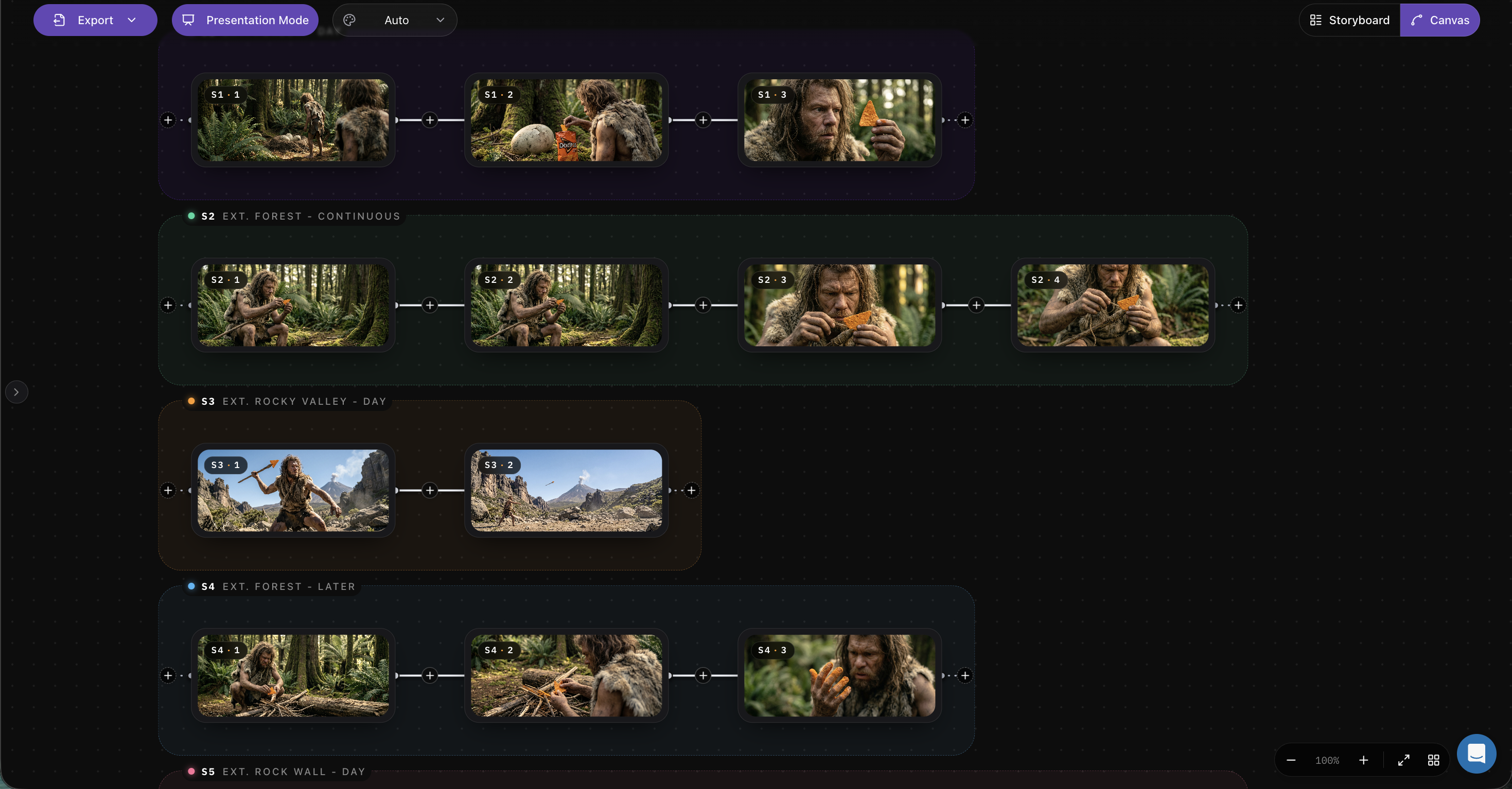
Paste the script into a tool like Boords, Storyboarder.ai, or Katalist. The AI reads the script, breaks it into scenes, and generates frame-by-frame visuals.
You can adjust camera angles, lighting, and composition on the fly. What used to take an illustrator three days now lands in 30 minutes.
Stage 4: Character and Style Consistency
This is where most AI tools used to fail. New platforms now lock character appearance across every frame.
Define your lead once. The system maintains the same face, outfit, and proportions in every scene. That consistency matters when clients review.
Stage 5: Animatic Previews for Client Approval
This is the agency superpower. Tools like Boords and Storyboarder.ai stitch frames into a rough animatic with timing and transitions.
Clients see pacing, not just panels. Feedback gets specific. Revision rounds drop because the client is no longer guessing what the final piece feels like.
Stage 6: Production Handoff
Export your storyboard with shot lists, camera notes, and timing. Production gets a package they can shoot from on day one.
Some platforms now integrate directly with Frame.io and Filestage. The handoff becomes a click, not a meeting.
Best AI Tools for Agency Pre-Production
Different tools solve different agency problems. Here is the short list.
Pick based on your biggest bottleneck. If clients drag approvals, start with Drawstory. If pitch volume is the issue, start with Storyboarder.ai or Katalist.
How to Roll AI Into Your Existing Agency Process
You do not need to rebuild your workflow. Plug AI into the steps that move slowest.
A simple four-step rollout works for most agencies:
4. Pick one bottleneck. Storyboards, moodboards, or approvals. Just one.
5. Pilot on one client. Use a low-risk project. Track the time saved.
6. Document the new step. Write down what changed. Share with the team.
7. Scale across accounts. Once the workflow is stable, roll it to the rest.
Keep a human review at every stage. AI tools for agencies accelerate the work. Your creative judgment still owns the output.
Mistakes to Avoid
A few traps catch agencies new to AI pre-production.
• Showing raw AI output to clients. Always do a human pass first. The output reads AI without one.
• Skipping the brief. A weak brief produces weak storyboards. AI or not.
• Letting tools dictate creative direction. AI is a translator, not a director.
• Hiding it from clients. Be honest. Most clients care about quality and speed, not the tool stack.
Treat AI as a junior producer with great recall and zero taste. That framing fixes most of the rollout problems.
What This Means for Your Agency
The agencies winning right now are not the ones using every tool. They are the ones who plug AI into the slowest 20 percent of their workflow.
For most teams, that 20 percent sits in pre-production. Storyboards, moodboards, and approvals. Compress those and your margins improve before you ever change a deliverable.
For storyboarding specifically, Drawstory handles the heaviest lift. Upload a script and get finished storyboard frames with character consistency across every panel. It is built for the speed and revision cycles agency teams deal with daily.
Start with one bottleneck. Pilot on one client. Measure honestly. The workflow you build this quarter will define what your team can pitch a year from now.
Frequently Asked Questions
Got Questions?
Find clear answers to common questions about Drawstory, our services, process, and how we bring your ideas to life.
What is an AI creative agency?


How does AI speed up agency storyboarding?
Is AI storyboarding accurate enough for client pitches?
Which AI tool is best for small agencies?
Will clients know we use AI?



