Sign Up
Film Production Storyboard: How to Plan Every Shot [2026]
Author:
Narek Ghazaryan
Date:
June 8, 2026
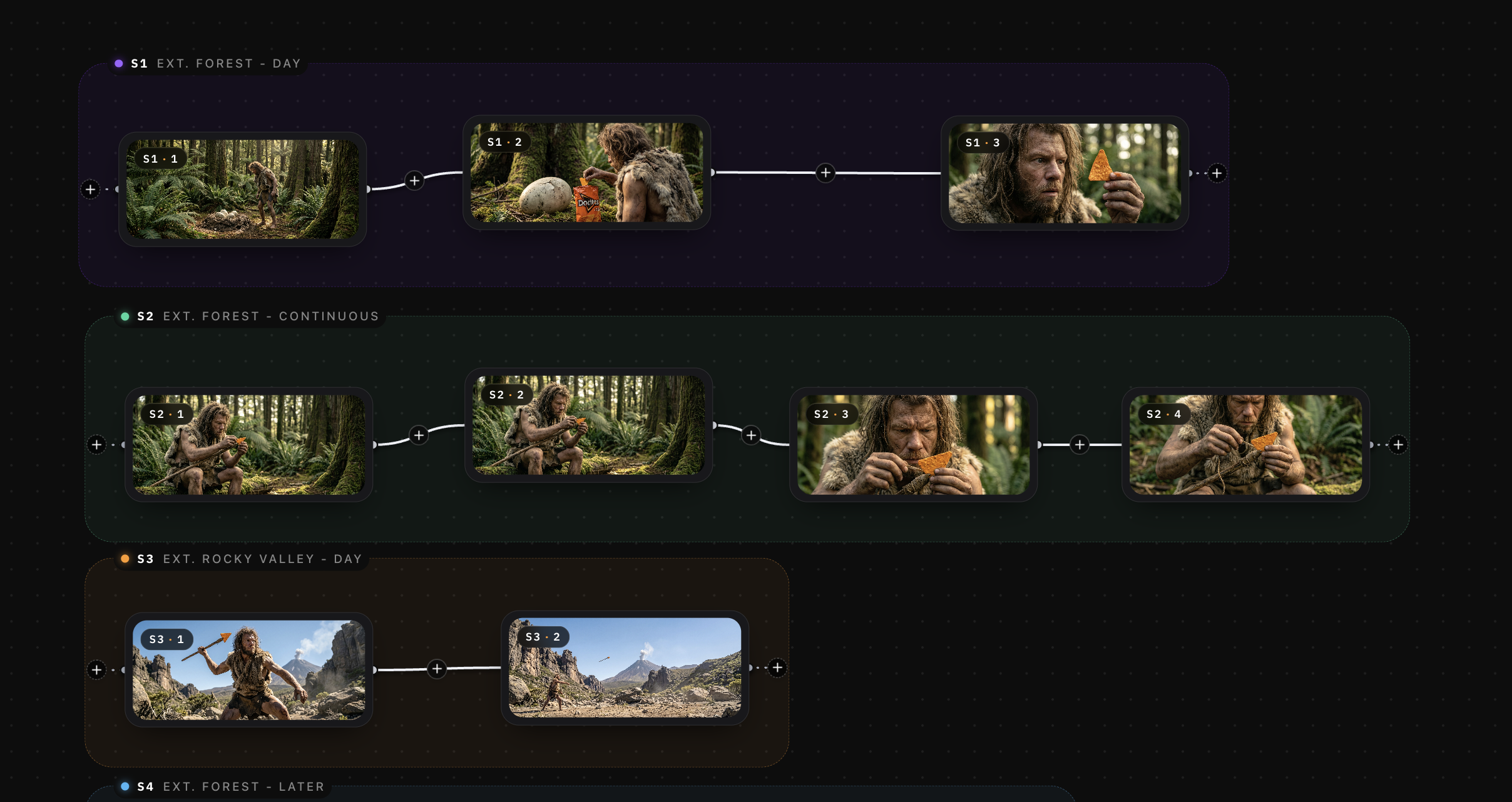
A director walks onto set with a plan in their head. The DP has a different plan. The 1st AD has another one entirely. Three versions of the same scene, none of them written down. This is what happens when a production skips the film production storyboard.
The global AI storyboard generator software market reached USD 278 million in 2026 and is projected to hit USD 388 million by 2034 at a CAGR of 5.7% (Intel Market Research). Visual planning tools are growing because they solve a real problem. Productions that storyboard before shooting spend less time on set and fewer dollars on reshoots.
This guide covers what a film production storyboard includes, how to build one from scratch, and where it fits in your pre-production workflow.
What Is a Film Production Storyboard?
A film production storyboard is a sequence of illustrated panels that map every shot in your script. Each panel shows a specific camera angle, character position, and composition. Together, the panels form a visual blueprint of your entire film.
The production storyboard serves three audiences. Directors use it to plan visual storytelling choices before the shoot. Cinematographers use it to prepare camera setups and lighting. The 1st AD uses panel counts to estimate how long each scene takes, which feeds directly into the shooting schedule.
A storyboard is not a mood board or a script breakdown. It is the bridge between the written word and the filmed image. For a deeper look at how panels come together, this guide on the storyboard creation process covers the full workflow from concept to finished frames.
Key Elements of a Film Production Storyboard
Every panel in your film production storyboard should communicate five pieces of information to the crew.
- Shot composition: the framing, angle, and depth of each shot. Wide, medium, or close-up. High angle or low. This tells the camera team exactly what to set up.
- Character blocking: where each actor stands, moves, or enters the frame. Blocking notes prevent confusion on set and reduce time spent repositioning between takes.
- Camera movement: pans, tilts, dollies, and tracks marked with arrows or annotations. Static shots need no note. Moving shots need direction, speed, and start or end positions.
- Dialogue or action cues: a brief line of dialogue or description of the physical action in the panel. This connects the image to the script.
- Transition notes: how one shot moves to the next. Cuts, dissolves, or match cuts all affect pacing. Marking them in the storyboard helps the editor plan the assembly before footage arrives.
Understanding cinematic composition techniques helps you select stronger angles and framing for each panel.
How to Create a Film Production Storyboard Step by Step
Step 1: Break Down Your Script
Go scene by scene. Identify every location, character, prop, and action beat. Note which moments are visually complex and which are simple dialogue exchanges. This breakdown tells you how many panels each scene needs. A film treatment often contains the earliest notes on visual direction that feed into this step.
Step 2: Build Your Shot List
Before drawing anything, write out the shots you need for each scene. Define the shot size, camera angle, and movement for each. A shot list and storyboard work together. The shot list is the written plan. The storyboard is the visual one.
Step 3: Sketch or Generate Your Panels
Each shot from your list becomes one panel. You do not need to be an artist. Rough sketches work if they communicate framing and blocking clearly. For productions on tight schedules, a text to storyboard approach lets you type scene descriptions and generate panels instantly. Script to storyboard tools take this further by reading your full screenplay and producing consistent characters and locations across every scene.
Step 4: Add Camera and Movement Notes
Mark arrows for camera movement. Label shot types. Include brief dialogue or action lines below each panel. These notes turn your storyboard from a set of pictures into a working production document.
Step 5: Review and Revise With Your Team
Share the film production storyboard with your DP, 1st AD, and department heads. Walk through it scene by scene. Adjust panels based on feedback. The storyboard is a living document that should evolve as the production plan solidifies. Early previs workflows speed up this review process by giving the team animated or interactive panel sequences.
Storyboarding for Production: When to Start
Start storyboarding as soon as you have a locked or near-locked script. The pre-production storyboard is one of the first visual documents in your workflow. It comes after the script breakdown and runs parallel to location scouting and casting.
The earlier your film production storyboard is complete, the earlier your 1st AD can build an accurate shooting schedule. Panel counts give real setup estimates. Real setup estimates give accurate day counts. Accurate day counts keep your budget honest.
Productions that wait until the last week of pre-production to storyboard get rushed panels and missed shots. Start early. Revise as needed. For teams that need speed without sacrificing quality, AI storyboarding generates complete panel sets in minutes rather than weeks. This breakdown of the best AI storyboarding tools covers your options.
Film Production Storyboard vs. Shot List
These two documents work together, but they are not the same thing.
A shot list is a written document. It records every shot by scene number, shot size, angle, movement, and description. It is organized for the crew to follow on set, sorted by setup efficiency rather than story order.
A film production storyboard is a visual document. It shows what each shot looks like, not just what it is. The storyboard reveals framing problems, composition gaps, and continuity issues that a written list cannot catch.
Use both. Write the shot list to define what you need. Build the storyboard to see it. Productions that skip the storyboard and rely only on a shot list miss problems they cannot spot until they are on set, when fixing them costs real money.
Common Storyboard Mistakes and How to Avoid Them
Over-detailing early panels:
Spending hours perfecting the first scene while the rest of the script goes unplanned.
How to avoid it: Rough out every scene at a sketch level first. Get full coverage, then go back and refine the complex sequences. A complete rough storyboard is worth more than five polished panels.
Ignoring camera movement:
Static panels that show composition but skip dolly, pan, and track notes leave the DP guessing on set.
How to avoid it: Add arrows for every moving shot. Label the type of move, direction, and speed. If the camera is static, mark it. Explicit notes prevent assumptions.
Skipping the script breakdown:
Jumping straight to drawing without analyzing the script first leads to missing shots and incomplete coverage.
How to avoid it: Break down every scene before you sketch a single panel. List locations, characters, props, and action beats. The breakdown tells you how many panels each scene actually needs.
Not sharing with the crew:
A storyboard that lives on the director's laptop helps no one on set.
How to avoid it: Distribute the film production storyboard to every department head during pre-production. Walk the team through it in person. Let them flag issues while changes are still free.
Treating it as final:
Locking the storyboard too early means it stops reflecting reality once locations shift or cast availability changes.
How to avoid it: Treat it as a living document. Update panels as conditions change. A storyboard that matches the current plan is useful. One that matches last month's plan is not.
Build Your Film Production Storyboard Before You Shoot
Every shot in your film starts as a decision. The film production storyboard is where those decisions get made, tested, and shared with your crew. Build it early. Revise it often. Let it guide every department from camera to art direction.
When you are ready to move from script to panels, DrawStory generates storyboard frames with consistent character designs and locations from your screenplay. Upload your script, generate your pre-production storyboard, and walk onto set with a visual plan your entire crew can follow.
Frequently Asked Questions
Got Questions?
Find clear answers to common questions about Drawstory, our services, process, and how we bring your ideas to life.
What is the difference between a storyboard and a shot list?


How detailed should a film production storyboard be?
Can I create a storyboard if I can't draw?
How many storyboard panels does a typical scene need?
Should storyboards include camera movements?



